Back

Building a better AI prototyping tool

Coding agents mean we can now go from idea to polished, high-fidelity interactions in a matter of minutes. That's great, but visually polished and conceptually polished are two different things. Fidelity bias tricks us into judging an idea by how finished it looks, not by how good it is.

Until now, ideas tended to move through sketches to wireframes and mid-fidelity mockups before they ever looked real. Each step was a natural altitude to step back to and judge an idea in simpler terms. Prototyping with code basically takes us there as the first stop, which leaves us with nowhere to zoom out to.
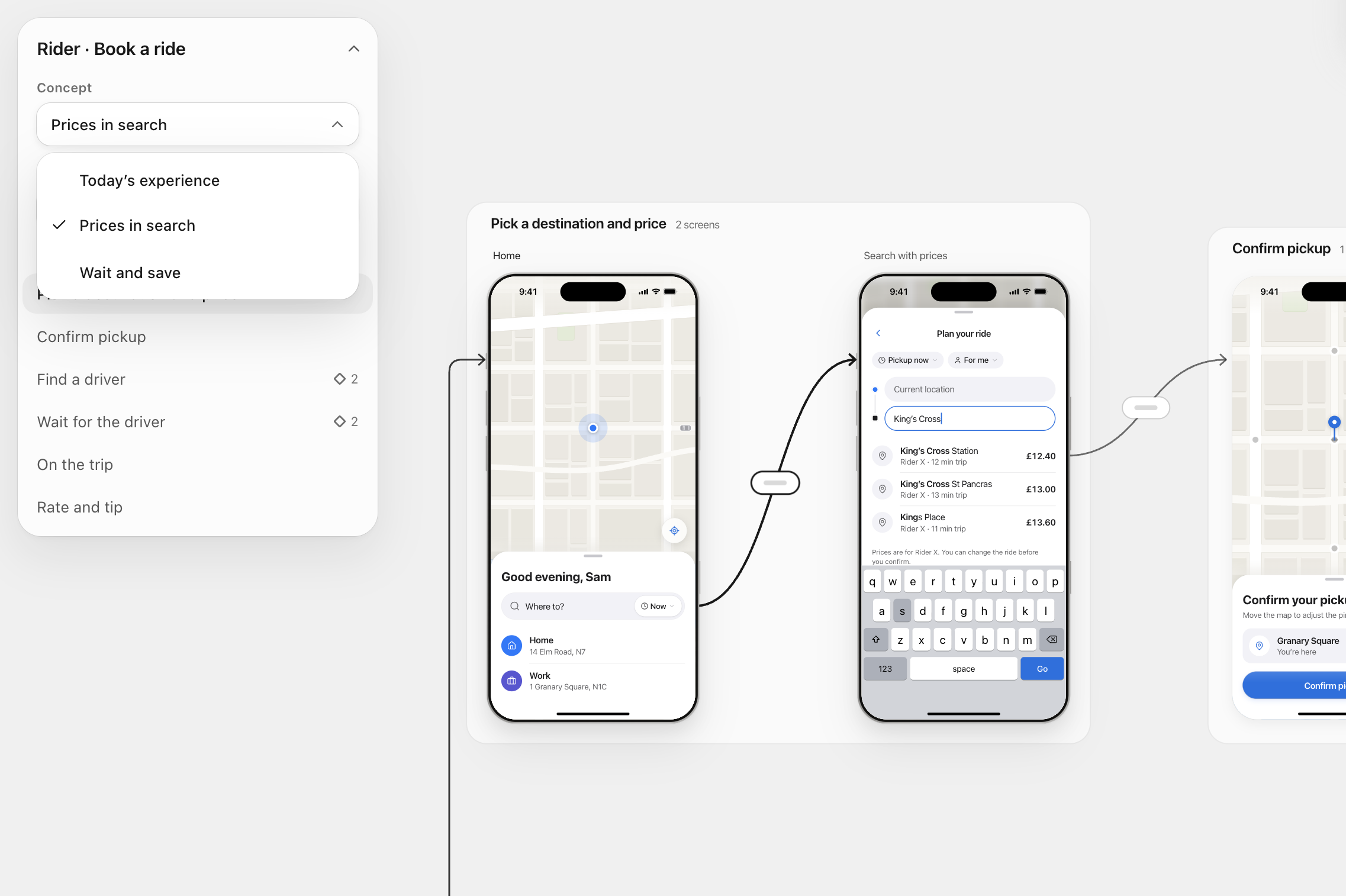
To help me zoom out of my code prototypes and see the bigger picture, I made a harness app. The harness wraps any prototype in three connected layers. I can import a vibe-coded prototype and it will strip it back into a screen-by-screen view and a super-simple user journey flow visual.

  1. Journey map

    Text only. Describe the experience in its simplest terms, with nothing to hide behind.

  2. Screen-by-screen flow

    Check the whole thing holds together before getting lost in the details.

  3. Interactive prototype

    The real thing, in code. Start here and zoom out, or start at the top and zoom in.

After sharing it with the team, other designers were keen to dive in and play with it. So far, the feedback has been great, and it's been really helpful both for prototyping and presenting design thinking at different levels.

  • Teammate

    Jimmy!! Can't wait to show you what I made with it

    I got a bit crazy

  • Teammate

    Its dope we have the whole IA phases mapped with it

  • Teammate

    Jimmy, you're magic!

    (Magic is just science that I don't understand yet)

  • Teammate

    this is awesome!!!!!

  • Teammate

    100/10 I recommend

  • Teammate

    tried it, love it, highly recommend it!!!

  • Teammate

    This tool is so flexible too! I've played around with it and created a whole new version of journey that I needed

  • Teammate

    This is EPIC!

Different prototypes, same canvas

Compare different approaches to the same problem at the same altitude, on the same canvas. It's the quickest way I've found to avoid tunnel vision on a single idea.

Concept switcher showing alternative approaches side by side at the same altitude

I had the idea of experimenting with Claude to create a fun launch video to share with the Design team. I started by planning out a storyboard, before Claude generated a basic animatic with a temp music track. From there, I set up a sub-agent evaluator with specific skills and acceptance criteria, and ran a loop until it reached the evaluator's benchmark score. For a pretty hands-off task, the result was surprisingly good.

  • Teammate

    i feel like im watching a trailer in the cinema !! jimmy this is sick !!

  • Teammate

    This is so cool! Also the video is amazing, how did you make it?!

  • Teammate

    was half expecting Steve Jobs to show up

  • Teammate

    Would love to understand the prompts and assets you've used to create that video 🤔 that's incredible shit

  • Teammate

    what magic was that??

  • Teammate

    Are you releasing the guide on how you made the promo vid đź‘€

  • Teammate

    get jimmy on the marketing team

  • Teammate

    I watched this video and thought it was a new startup and google searched but it's JIMMY

  • Teammate

    dude that looks awesome

  • Teammate

    Is it possible to learn this power?

I wrote a Substack article on the problem in more detail, and how I'm using the new tool in my day to day work. You can check it out here: